

Introduction: A Revolutionary Design Overhaul Arrives
Apple has officially released its most significant operating system redesign in over a decade. Announced at the Worldwide Developers Conference in June 2025 and launched on September 15, the newest version represents a dramatic reimagining of how iPhone users interact with their devices. With a complete visual overhaul called Liquid Glass, enhanced artificial intelligence capabilities, and fundamental improvements to core applications, this update fundamentally transforms the iPhone experience in ways that extend far beyond typical annual incremental improvements.
The decision to rename the operating system from iOS 19 to iOS 26 reflects Apple’s commitment to aligning all its operating systems—macOS, iPadOS, watchOS, and visionOS—under a unified naming convention. This shift signals that the company views this release not as a minor update, but as a watershed moment in iPhone evolution comparable to the introduction of iOS 7 in 2013, which revolutionized Apple’s design language with its introduction of flat design principles.
The Liquid Glass Design Revolution: What Changed and Why
The most visually striking aspect of this update is the introduction of Liquid Glass, a new design philosophy emphasizing transparency, fluidity, and dynamic interaction patterns. This design language fundamentally differs from iOS 18’s more static interface, introducing elements that respond fluidly to user interaction and device positioning.
The Lock Screen becomes noticeably more expressive under Liquid Glass principles. The time now fluidly adapts to available space within wallpaper images rather than remaining fixed in predefined locations. When users move their devices, spatial scene wallpapers respond with three-dimensional effects, creating dynamic depth perception on what was previously a static background. This transformation moves the Lock Screen from a utilitarian information display toward an interactive canvas that responds to user movement.
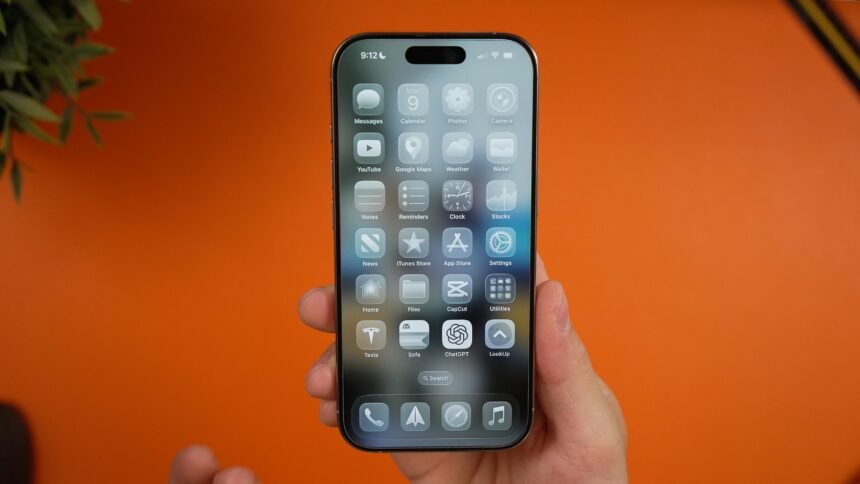
Home Screen icons, toolbars, and interface elements throughout the system feature newly transparent and translucent designs consistent with the Liquid Glass aesthetic. Rather than solid opaque icons, transparent elements show content beneath them, creating visual layering and depth. Control Center, Notification Center, and system dialogs all incorporate these glass-morphism design principles, giving the interface a sophisticated, unified appearance that distinguishes it dramatically from previous versions.
Safari undergoes one of the most dramatic transformations, with edge-to-edge webpage browsing eliminating traditional address bar positioning. Dynamic controls appear upon tapping, then fade away to maximize available viewing space. This substantial redesign reflects months of user research aimed at optimizing how people actually browse the web on mobile devices.
The Camera application receives a simplified layout that helps users maintain focus on the moment they’re capturing rather than interface elements. Photography features reorganize around user intent, with dominant buttons for primary functions and less-frequently used options requiring deliberate interaction.
Photos app gains separate Library and Collections tabs, fundamentally changing how users navigate their image libraries. This organizational restructure acknowledges that browsing all photographs and accessing curated collections serve different purposes requiring distinct interfaces.
Apple Intelligence Integration: The Future of Artificial Intelligence on iPhone
The deepening integration of Apple Intelligence represents the company’s commitment to bringing sophisticated artificial intelligence capabilities to users while maintaining privacy as a core principle. Unlike cloud-dependent AI systems, Apple Intelligence processes information on-device whenever possible, meaning your personal information remains on your device rather than transmitted to company servers for processing.
Live Translation functionality now appears throughout Messages, FaceTime, and Phone applications, enabling real-time translation of both text and audio conversations. Users can communicate seamlessly across language barriers without switching applications or interrupting conversations. This feature demonstrates how artificial intelligence enhances fundamental human connection rather than merely providing novelty capabilities.
Visual Intelligence allows users to gather information about objects and locations around them simply by pointing their camera. Rather than switching applications to search for information, users access context-aware intelligence directly from the camera interface. If you see an interesting lamp, you can instantly identify similar items for purchase across applications like Etsy. If an unfamiliar instrument appears in a social media video, you can immediately gather information about songs featuring that instrument.
Genmoji and Image Playground capabilities expand substantially, enabling users to combine existing emojis with descriptions to create entirely new custom emojis and images. Rather than selecting from predetermined options, users generate personalized visual expression matching their specific communication needs. Enhanced ChatGPT integration enables users to gather additional styling options and creative variations within Image Playground.
Shortcuts become more intelligent with the introduction of intelligent actions—a new category of shortcuts powered by on-device artificial intelligence. Users access dedicated actions for Writing Tools and Image Playground, making these powerful features accessible through automation without requiring complex programming knowledge.
Messaging and Communication Enhancements: Staying Connected
The Messages application receives substantial enhancements reflecting Apple’s understanding that communication represents messaging’s core purpose. Polls within Messages conversations help group decision-making, with artificial intelligence capable of suggesting when polls would enhance communication. Custom background generation using Image Playground creates unique conversation aesthetics matching participant personalities.
Spam Detection automatically categorizes messages from unknown senders into separate queues requiring approval before viewing, protecting users from unsolicited communications while ensuring important messages never get overlooked. This intelligent filtering enhances message quality without risking missed important communications.
Group chat improvements include visible typing indicators showing when others are composing messages, creating more natural conversation flow resembling face-to-face interaction. Users can request, send, and receive Apple Cash directly within group conversations, streamlining financial interactions among friends and family.
Phone Application Redesign: Managing Calls Intelligently
The Phone application undergoes substantial reorganization that meaningfully simplifies call management. Rather than requiring users to switch between Favorites, Recents, and Voicemail tabs, a consolidated interface presents all three categories within a single view. This unified approach reduces navigation friction while maintaining access to the information users actually need.
Call Screening uses artificial intelligence to respond silently to unknown callers, allowing users to choose whether to answer or decline without direct interaction. Simultaneously, artificial intelligence generates summaries of voicemail messages, enabling users to quickly understand message content before deciding whether to listen to complete recordings. This intelligent filtering reduces call management friction while respecting user privacy.
A new Hold Assist feature manages phone call holds intelligently, automatically monitoring call status and alerting users when hold status changes. No longer will users lose track of whether their call remains active or has been disconnected during extended holds.
Expanded System Capabilities Across Native Applications
Apple Maps gains intelligence through Visited Places functionality, which remembers locations users have been by detecting when they’re at restaurants, shops, or other notable locations. End-to-end encryption ensures these location histories remain private and accessible only to the user. Additionally, the Maps application uses on-device intelligence to understand users’ daily routines, automatically suggesting preferred routes when heading home or to work while notifying users of delays and offering alternate routes proactively.
Apple Music introduces Lyrics Translation enabling users to understand favorite songs in other languages, breaking down language barriers to music enjoyment. Lyrics Pronunciation helps users sing along to songs regardless of language familiarity. AutoMix uses artificial intelligence to transition seamlessly between songs like a professional DJ, using time-stretching and beat matching to create continuous, uninterrupted listening experiences.
The new Games application provides a unified destination for all games on iPhone, with curated collections, personalized recommendations, and seamless access to gaming library without requiring users to hunt through different applications or navigate cluttered home screens.
CarPlay receives substantial updates, particularly in the CarPlay Ultra variant, which delivers deep integration between iPhone and vehicle systems. This unified experience spans every screen in vehicles equipped with CarPlay systems, creating cohesive integration between pocket device and transportation.
Accessibility Improvements: Inclusion for All Users
Accessibility Reader provides customized system-wide reading experiences adapting to individual user preferences and needs. Braille Access introduces an entirely new interface for users with connected braille displays, enabling comprehensive interaction with iPhone through braille input and output.
Updates to Live Listen, Background Sounds, Personal Voice, and other established accessibility features bring substantial improvements across the Apple ecosystem. These enhancements reflect Apple’s commitment to ensuring everyone can fully use iPhone regardless of sensory abilities.
Public Beta Testing: How to Experience iOS 26 Early
Apple released public beta versions throughout summer 2025, allowing early adopters to experience upcoming features before final release. The public beta program opened on July 24, 2025, enabling free participation by anyone with compatible iPhones registered with Apple’s Beta Software Program.
To install the public beta, users navigate to Settings > General > Software Update > Beta Updates and select the version they wish to test. Important considerations include backing up devices before installing beta software, as unreleased versions occasionally encounter stability issues. Most users benefit from waiting for the final September release rather than experiencing potential beta software challenges.
Developer beta versions released earlier in the summer provided professionals building applications for the platform early access to new capabilities. However, developer betas required Apple Developer Program membership and proved substantially less stable than public beta releases.
Compatibility: Which iPhones Receive This Update
The update supports an impressive range of iPhone models spanning multiple generations. iPhone 12, iPhone 12 mini, iPhone 12 Pro, and iPhone 12 Pro Max receive full compatibility, along with all subsequent iPhone models including iPhone 13, iPhone 14, iPhone 15, and the new iPhone 17 series.
Even the third-generation iPhone SE, released in 2022, qualifies for the update, demonstrating Apple’s commitment to providing modern features across its product range. This broad compatibility means the vast majority of active iPhone users worldwide can experience the new design language and artificial intelligence features immediately upon public release.
Performance Considerations: What to Expect
The new Liquid Glass design and expanded artificial intelligence processing do require more system resources than iOS 18. Devices with more recent processors—particularly the A17 Pro and newer—deliver optimal performance with fluid animations and responsive interface interactions. Older devices like the iPhone 12 still receive the update and display the new design language, though animation fluidity might not match newer devices.
Artificial intelligence processing occurs on-device for most features, meaning processing loads concentrate locally rather than depending on network connectivity. This local processing approach improves performance while protecting privacy, though it does require adequate device processing power.
Battery life performance depends on usage patterns. Expanded background processing for artificial intelligence features might impact battery life on devices performing extensive processing. However, Apple’s optimization focus typically results in reasonable battery performance even with increased processing demands.
The Strategic Significance of This Release
This update represents Apple’s most significant design overhaul since 2013, signaling leadership in thinking about how operating systems should evolve as devices become more sophisticated and user expectations expand. The Liquid Glass design language appears across five different operating systems simultaneously, demonstrating Apple’s commitment to unified experiences across its entire hardware ecosystem.
The expanded artificial intelligence capabilities position Apple directly against Google’s Pixel devices and other Android phones emphasizing artificial intelligence features. By integrating intelligence throughout the operating system while prioritizing on-device processing and privacy, Apple offers a distinctive artificial intelligence approach focused on usability rather than data collection.
The rename from iOS 19 to iOS 26 signals Apple’s thinking about operating systems in terms of years rather than sequential numbering. This convention suggests that future yearly releases will carry the year they release rather than requiring users to mentally track incremental version numbers.
Looking Ahead: What’s Still Coming
Despite the comprehensive scope of this release, one notable absence is the enhanced Siri assistant Apple initially promised for 2024. Delays in bringing more capable Siri features to users have been postponed until at least 2026, representing one of the few disappointing aspects of otherwise impressive updates. The company remains committed to delivering substantially smarter Siri functionality, though exact timelines remain uncertain.
Additionally, various Apple Intelligence features rolled out gradually throughout 2025 rather than arriving simultaneously. This phased approach reflects Apple’s commitment to thorough testing rather than releasing unfinished capabilities.
Installation and Setup: Getting Started
Installing the final public release proves straightforward. Users navigate to Settings > General > Software Update and tap Download and Install when prompted. Most updates complete overnight when devices are plugged in and connected to Wi-Fi, ensuring minimal disruption to daily usage.
First-time setup after installation walks users through new features, explaining Liquid Glass design changes and demonstrating new artificial intelligence capabilities. Users can customize how much artificial intelligence assistance they want throughout the system, respecting individual preferences about automation versus manual control.
Conclusion: A Transformative Year for iPhone
The arrival of this major update marks a significant inflection point for iPhone and Apple’s broader ecosystem. By fundamentally rethinking design language through Liquid Glass, substantially expanding artificial intelligence capabilities while protecting privacy, and redesigning core applications around how users actually interact with their devices, Apple demonstrates why it remains at the forefront of mobile operating system design.
Whether you update immediately or wait for a few weeks as third-party application developers optimize their software, the new features represent investments Apple made to enhance how you actually use your iPhone daily. The combination of visual sophistication, intelligent assistance, and fundamental interface improvements make this far more than a routine annual update—it’s a reset of expectations about what iPhone users can expect from their devices moving forward.